




H7
FIRST STEPS
This section guides the operator through the main initial procedures required to use the IdroMOP H7 correctly.
- Click on the dots
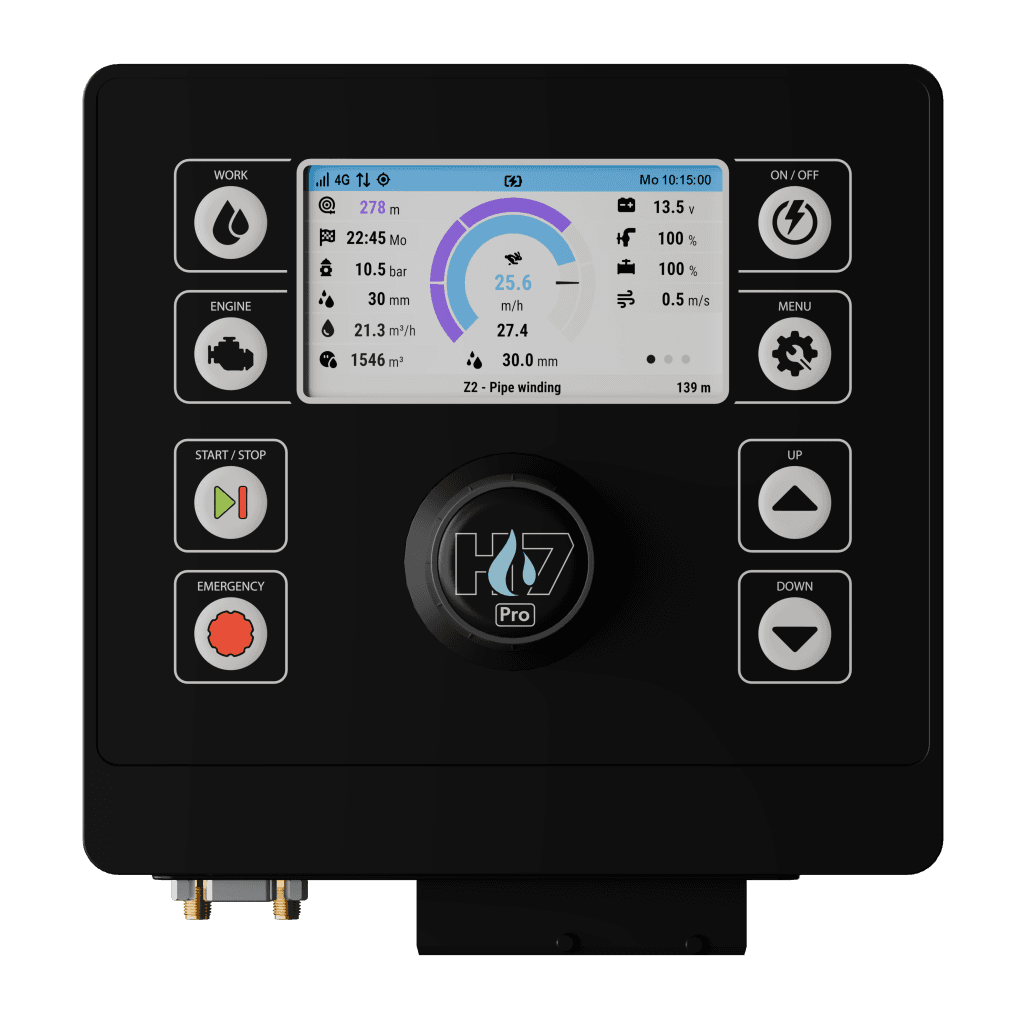
DASHBOARD
Displays the main operating information of the machine.
KNOB
It allows you to navigate between dashboard, menus and parameters. Rotating it scrolls through the available entries, while pressing it allows you to access the submenus, change the values and confirm the settings.
WORK
Allows you to access the irrigation page or navigate between dashboard parameters
ON/OFF
Allows the device to be turned on and off with prolonged pressure. With short press it allows access to the Action menu.
ENGINE
Allows you to access the engine page, if available, or navigate the engine dashboard parameters.
MENU
Allows access to the main menu of the device.
START/STOP
It allows irrigation to be started in the absence of alarms or work in progress to be stopped.
UP
Increases the set adjustment value.
EMERGENCY
Allows immediate stopping of the machine in case of emergency.
DOWN
Decreases the set adjustment value.
DASHBOARD
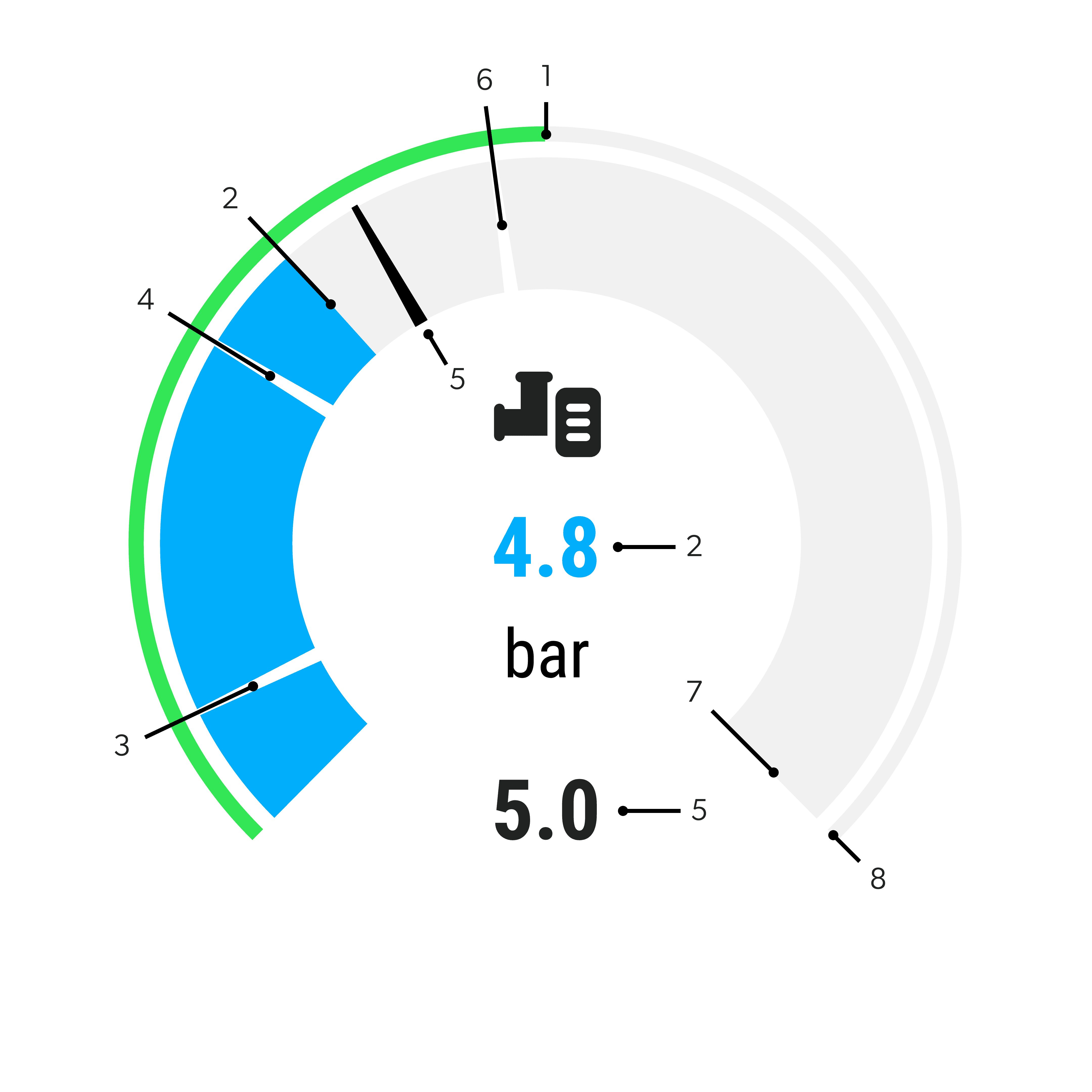
PUMPING UNIT – AUTOMATIC PROGRAM
Mode that allows the desired working pressure to be set. The control unit automatically adjusts the engine speed to maintain stable pressure during operation.
1 – Engine speed
2 – Measured water pressure
3 – Minimum system pressure
4 – Underpressure tolerance
5 – Pressure setpoint
6 – Overpressure tolerance
7 – Maximum system pressure
8 – Engine overspeed
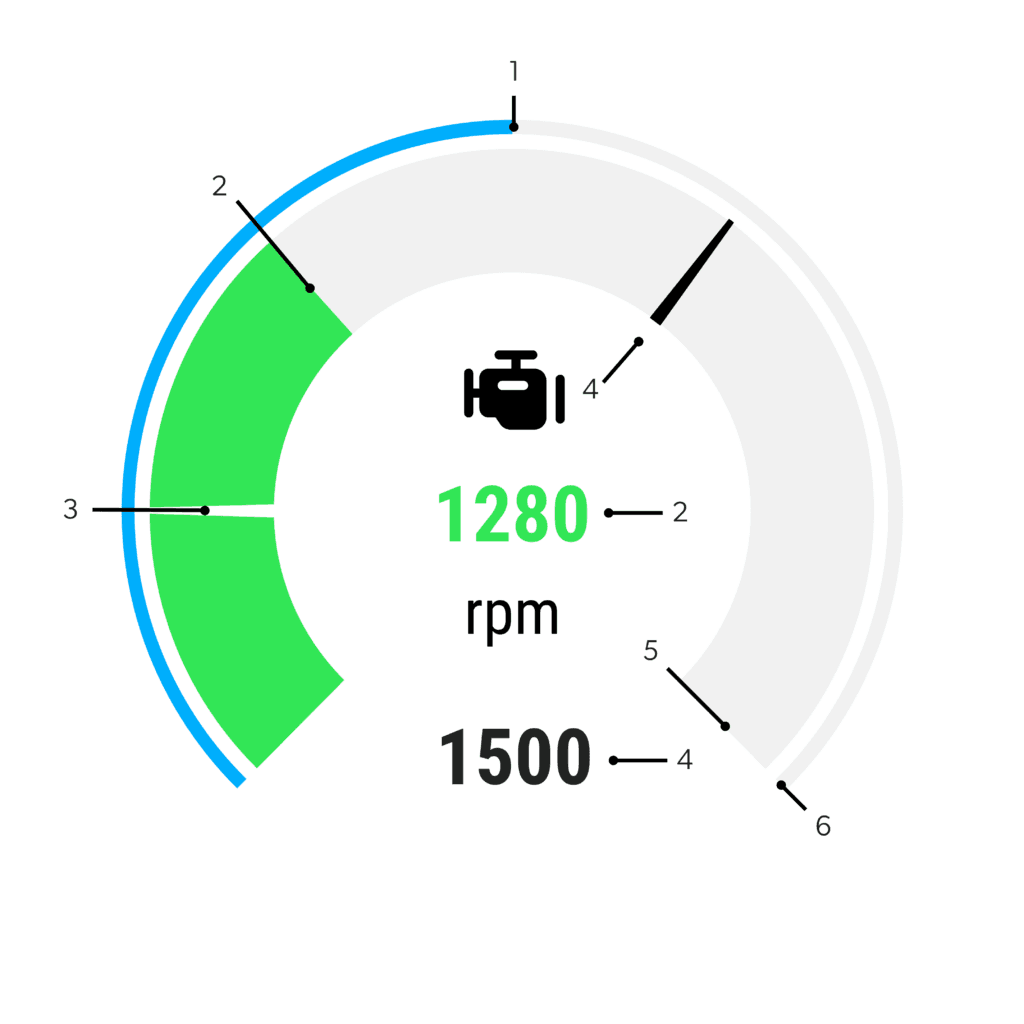
PUMPING UNIT – MANUAL PROGRAM
Mode that allows the desired engine speed to be set manually. The control unit maintains the selected engine speed during machine operation.
1 – Measured pressure
2 – Measured engine speed
3 – Minimum engine speed limit
4 – Engine speed setpoint
5 – Engine overspeed
6 – Maximum system pressure
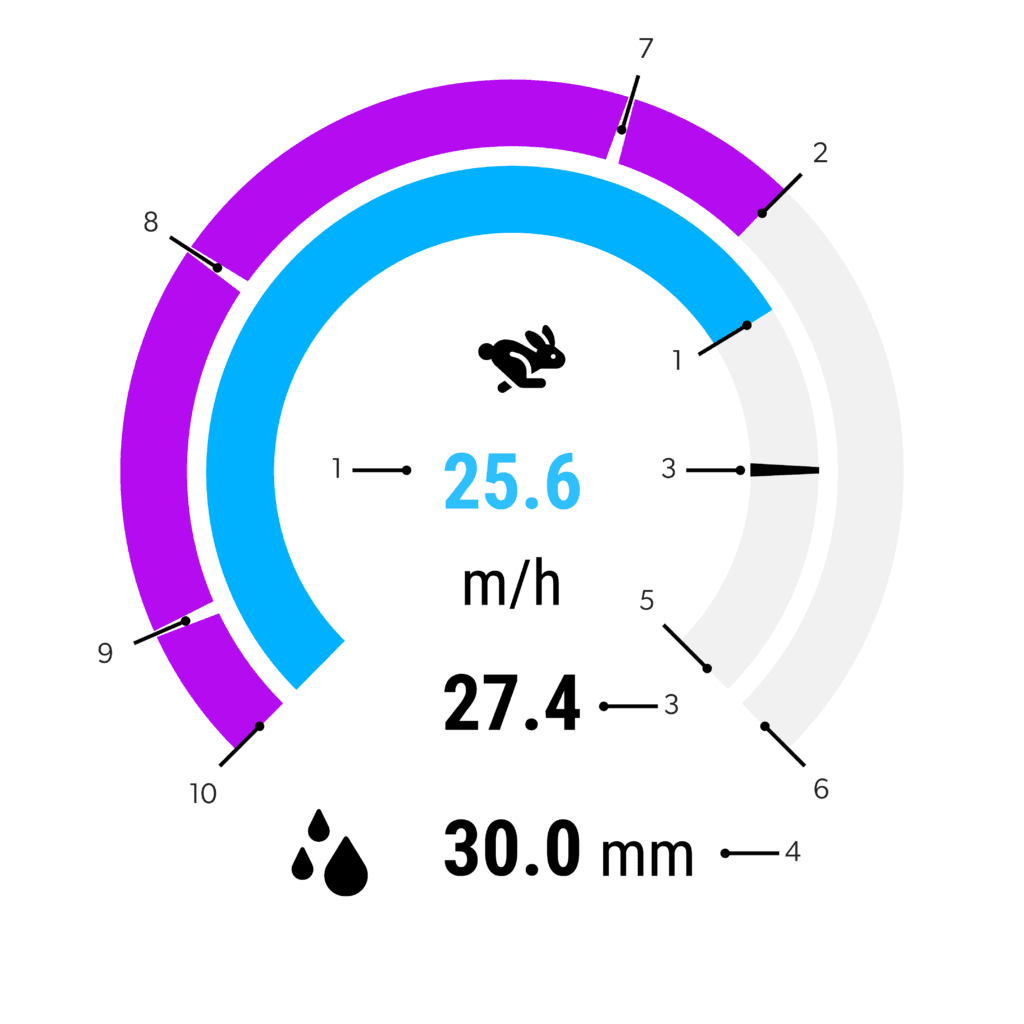
IRRIGATION MACHINE – IRRIGATION MODE
Mode that allows the desired return speed or rainfall rate to be set. The control unit automatically maintains the selected value: if the return speed is set, the corresponding rainfall rate is displayed; if the rainfall rate is set, the return speed is adjusted accordingly.
1 – Measured return speed
2 – Remaining hose length deployed
3 – Return speed set point
4 – Rainfall rate set point
5 – Maximum return speed
6 – Hose length deployed at the start of irrigation
7 – End of zone 1
8 – End of zone 2
9 – End of zone 3
10 – End of zone 4
PUMPING UNIT – AUTOMATIC PROGRAM
Mode that allows the desired working pressure to be set. The control unit automatically adjusts the engine speed to maintain stable pressure during operation.
1 – Engine speed
2 – Measured water pressure
3 – Minimum system pressure
4 – Allowed underpressure
5 – Water pressure set point
6 – Allowed overpressure
7 – Maximum system pressure
8 – Engine overspeed
PUMPING UNIT – MANUAL PROGRAM
Mode that allows the desired engine speed to be set manually. The control unit maintains the selected engine speed during machine operation.
1 – Measured pressure
2 – Measured engine speed
3 – Minimum engine speed limit
4 – Engine speed set point
5 – Engine overspeed
6 – Maximum system pressure
IRRIGATION MACHINE – IRRIGATION MODE
Mode that allows the desired return speed or rainfall rate to be set. The control unit automatically maintains the selected value: if the return speed is set, the corresponding rainfall rate is displayed; if the rainfall rate is set, the return speed is adjusted accordingly.
1 – Measured return speed
2 – Remaining hose length deployed
3 – Return speed set point
4 – Rainfall rate set point
5 – Maximum return speed
6 – Hose length deployed at the start of irrigation
7 – End of zone 1
8 – End of zone 2
9 – End of zone 3
10 – End of zone 4
MOTOR PUMP – PUMPING UNIT
Check that the machine is ready: no active alarms, no external stop or emergency active, water available, sufficient fuel, and the correct program selected.
From the WORK or ENGINE page, press START/STOP to display the summary of the current program. Check that the program is correct; otherwise, exit and select it from the Programs menu. Press START/STOP again to confirm the start, or hold the knob down for about one second to cancel the procedure.
After start confirmation, the control unit automatically manages the initial phases: pump priming, if required, engine start, warm-up* and system filling.
In Automatic mode, the machine brings the system to the minimum working pressure before starting irrigation.
In Manual mode, after start-up, the system enters the working state directly and the operator can adjust the engine speed using the UP and DOWN keys.
Once the required conditions are reached, the pump starts operating and the display shows the real-time parameters.
*During the warm-up phase, the operator can reduce or skip the remaining time from the ENGINE page by pressing the knob when the bar shows “WARM-UP”. By selecting “SKIP”, the machine moves directly to the next phase. This function should only be used when the engine is already warm, to avoid component wear.
Once the start-up phases are completed, the machine enters the operating state and the pump begins normal operation.
Using the UP and DOWN keys, the operator adjusts the engine speed in Manual mode or sets the pressure setpoint in Automatic mode. The setpoint is maintained within the minimum and maximum limits defined by the selected program.
During operation, the display shows the main real-time parameters, such as engine speed, pressure, temperature, fuel level, and remaining operating time.
If required, the remaining irrigation time can be modified from the ACTIONS menu through the “IRRIGATION TIME” item.
When the machine is stopped, it is possible to change the operating mode from the ACTIONS menu by selecting “AUTOMATIC/MANUAL“. The selected mode remains the default for subsequent start-ups until another program is selected.
Irrigation can be stopped manually by the operator, automatically at the end of the programmed time, or in the event of an alarm.
1 – Stop Requested by the Operator
During operation, the operator can press START/STOP from the WORK or ENGINE page to start the stop sequence: the engine speed drops to idle, the delivery valve closes, the pump disengages and the cooling phase begins, if configured. At the end of the procedures, the engine stops.
2 – Scheduled Time-Based Stop
If the program includes an irrigation time, the machine stops automatically when the remaining time reaches zero. If the time is set to zero, irrigation continues until the operator stops it manually.
During normal stops, the engine does not stop immediately: after the pump disengages, it remains at idle for the configured cooling time. At the end of this phase, the control unit stops the engine and the machine returns to STANDBY.
During cooling, the operator can reduce or skip the remaining time by pressing the knob when the bar shows “COOLING”. The “SKIP” function should only be used when necessary, to avoid engine wear.
For motor pump machines, no pause function is available: each interruption corresponds to a complete stop. To resume operation, irrigation must be started again.
Priming fills the pump with water and removes the air inside, allowing the pump to operate correctly. On motor pump machines, if the machine is configured with a priming system and the pump is not already full, the procedure starts automatically before the engine starts. In case of maintenance, diagnostics, or first filling, priming can be started manually from the ACTIONS menu through the “PRIMING CONTROL” item.
The delivery valve controls the flow of water from the pump to the irrigation system. During the work cycle, the control unit automatically manages its opening and closing according to the operating phase, pressure, and engine speed. In Automatic mode, during filling, the valve opens progressively. During stopping, it closes to secure the hydraulic system. If the machine is configured with a servo-controlled valve, it can be managed manually from the ACTIONS menu through “DELIVERY CONTROL”, only with the engine stopped and for service, maintenance, or diagnostic operations.
The EMERGENCY button only operates when the machine is working. When pressed, the control unit activates the emergency alarm and starts the quick stop sequence. Pressing it when the machine is stopped has no effect: this is not a fault.
This command does not replace any mechanical emergency stop button, which must be used in case of immediate danger to people or property.
In the event of a fault, the control unit may automatically stop operation to protect the engine and the system. When an alarm occurs, the machine stops working and displays the warning on the screen. Before restarting, the cause must be identified and resolved, then the alarm must be reset from the ACTIONS menu through “ALARM RESET”.
Do not restart the machine repeatedly without removing the fault.
In case of an emergency or high-priority alarm, the machine performs a quick stop: the engine drops to idle speed and is stopped without the normal cooling phase.
In the event of a power failure, the control unit stops the irrigation in progress and starts an orderly shutdown of the control unit.
The hardware backup allows the necessary data to be saved and communications to be closed correctly, but it does not allow operation to continue.
When power is restored, the machine restarts in STANDBY and irrigation does not resume automatically.
To resume operation, the operator must check that the cause of the interruption has been resolved, inspect the machine and the system, and then restart irrigation.
The control unit monitors maintenance operations through counters based on the actual engine working hours, counted only when the engine is running. The counters may refer to the engine oil filter, fuel filters, the first unified 100-hour service and, on Stage V engines, the AdBlue circuit filter.
The first unified service includes the oil filter and fuel filters. Until this service is confirmed, the related periodic counters remain inactive; after confirmation, they are activated and start calculating the next deadlines independently.
The maintenance status can be checked from the Diagnostics menu.
The page shows the active counters, the remaining hours and the status of the intervention: normal, maintenance approaching, or maintenance overdue. The page is for viewing only: the counters are not reset from here.
When maintenance is approaching its deadline or is overdue, the control unit displays a recurring pop-up warning. The deadline does not block machine operation, but the maintenance must be carried out as soon as possible.
After completing the maintenance, the operator can confirm it from the pop-up by selecting “DONE”. The counter is then reset and restarts from the new scheduled interval.
HOSE REEL MACHINE
The ENGINE page is available only for hydraulic and integrated machines.
Before starting irrigation, the operator must manually unwind the hose by pulling the trolley to the working position.
During unwinding, the reel clutch must be disengaged and the control unit updates the amount of hose laid out on the display in real time.
When the unwound hose approaches the maximum length, the control unit generates the “HOSE RUNNING OUT” warning, issued 25 metres before the configured limit. In this case, traction must be stopped immediately to avoid damage to the hose or couplings. The warning is cleared automatically if the trolley is moved back below the threshold.
The machine is considered ready when the unwound hose exceeds 20 metres; below this threshold, the START command is not accepted.
If the hose approaches the maximum length, the “HOSE RUNNING OUT” warning appears: in this case, traction must be stopped immediately to avoid damage to the hose or the machine.
If the displayed value does not correspond to the actual hose laid out, it can be corrected from the OPERATION menu through the “UNWOUND HOSE” item.
Only for hydraulic and integrated machines.
Positioning allows only the engine to be started, without starting irrigation or winding. It is used to prepare the machine, perform checks, or recharge the battery.
The engine can be started from the OPERATION menu via “ENGINE CONTROL”, or by holding down the ENGINE key from the WORK or ENGINE page. In both cases, the control window opens and the start must be confirmed by selecting “START” with the knob.
Complete irrigation, on the other hand, is started only with START/STOP and includes the engine, valves, and winding.
At the end of positioning, the engine is stopped from the “ENGINE CONTROL” window by selecting “STOP”. If configured, the control unit performs a cooling phase before the final shutdown.
Check that the machine is ready: no active alarms, no external stop or emergency active, regular water supply within the expected pressure values, hose unwound beyond the minimum threshold, and trolley correctly positioned in the field.
From the WORK page, press START/STOP to display the summary of the current program. Check that the program is correct; otherwise, exit and select it from the Programs menu. Press START/STOP again to confirm the start, or hold the knob down for about one second to cancel the procedure.
After start confirmation, the control unit automatically manages the initial phases: any waiting time for the scheduled start, opening of the inlet valve, and initial pause, if required by the program.
At the end of these phases, the water drives the internal hydraulic turbine, the reel starts winding, and the trolley returns towards the machine, starting irrigation.
During irrigation, the field is divided into four consecutive sectors: Z1, Z2, Z3, and Z4.
These sectors represent the different portions of the trolley path, from the farthest position back toward the machine. Z1 corresponds to the starting zone, where the trolley is located at the beginning of irrigation; Z2 and Z3 are the intermediate zones crossed during return; Z4 is the final zone, closest to the machine.
Each sector has a depth set in metres. The sum of the depths of the four sectors defines the total depth of the field to be irrigated.
Each zone can have dedicated parameters, such as winding speed, rainfall rate, front, and pauses. Based on the trolley position, the control unit automatically recognizes the sector being crossed, updates the working parameters defined by the program, and shows the new active zone and the set parameters on the display.
During operation, the hydraulic turbine progressively winds the hose and the trolley returns towards the machine, while the sprinkler distributes water along the path.
On the WORK display, the operator can view the main operating data in real time, including winding speed, trolley position, arrival time, pressure, rainfall rate, flow rate and any detected wind.
The winding speed can be adjusted using the UP and DOWN keys, within the limits allowed by the machine. The change applies to the current sector; when moving to the next zone, the control unit applies the parameters configured in the program.
During irrigation, sector pauses may be activated, if previously set. During these pauses, the trolley remains stationary while water continues to flow to the sprinkler, concentrating irrigation on a specific area of the field. If necessary, the operator can modify the remaining duration of the active pause from the OPERATION menu by selecting the current pause item and setting the new value.
The machine can also automatically suspend winding in the event of water shortage or strong wind, resuming operation when the conditions return to normal.
During an irrigation cycle in progress, the operator can manually suspend operation by pressing START/STOP from the WORK page.
Suspension stops winding if it is in progress, closes the valves, secures the machine and saves the trolley position reached in memory. This allows irrigation to be resumed later from the same point.
Manual suspension must not be confused with sector pauses: pauses are automatic, defined by the program, and keep water flowing from the sprinkler; suspension, on the other hand, takes the machine out of operation.
To resume a suspended irrigation cycle, press START/STOP from the WORK page, check the program summary and confirm again with START/STOP. The control unit automatically recognizes the resume operation and restarts winding from the saved point.
To start a new irrigation cycle after a suspension, the previous cycle must first be completed by bringing the machine back to standby, then the hose must be laid out again for a new operation. Otherwise, pressing START again will resume the previous irrigation cycle.
In case of automatic suspension due to an alarm, the cause must be resolved, the alarm must be reset from the OPERATION menu through “ALARM RESET”, and irrigation can then be resumed using the same procedure.
Irrigation ends when the trolley returns to the machine and reaches the stop point configured in the program.
At the end of winding, the control unit stops the turbine and, if configured, performs the Z4 end-of-field pause. After that, the machine closes the valves and automatically returns to STANDBY, or to READY if the hose is still extended beyond 20 metres.
Manual stopping via START/STOP, on the other hand, corresponds to a suspension.
The EMERGENCY button only operates when the machine is working. When pressed, the control unit activates the emergency alarm and starts the quick stop sequence. Pressing it when the machine is stopped has no effect: this is not a fault.
This command does not replace any mechanical emergency stop button, which must be used in case of immediate danger to people or property.
In the event of a fault, the control unit may automatically stop operation. When an alarm occurs, the machine stops working and displays the warning on the screen. Before restarting, the cause must be identified and resolved, then the alarm must be reset from the ACTIONS menu through “ALARM RESET”.
Do not restart the machine repeatedly without removing the fault.
In the event of a power failure, the control unit saves the work status in memory.
When power is restored, the machine returns to the WORK page in “READY” status, but does not resume automatically. The operator must check the machine and the system, then confirm resumption with START/STOP. Irrigation restarts from the point where it was interrupted.
To start a new irrigation cycle after an interruption, the status of the previous cycle must first be closed according to the procedure defined by the machine configuration.